Note: This is an article for experienced M-Box users that choose to work with “Advanced Projects”. If you are not (yet) familiar with the functionality of Quick Jobs and Basic Projects, we recommend reading on that first.
To complete a project or sales order you may need to produce several different parts in different quantities. Each part can require a series of production steps, with their own program or work instruction, input material, and tools or fixtures. M-Box helps you organize the complete process with clear scheduling and file maintenance. This article explains how.
________________________________________________
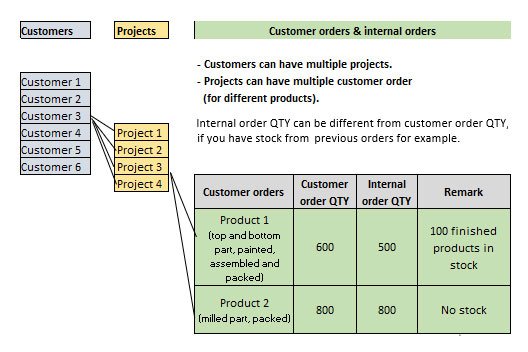
Customer Order – is a quantity of a product ordered by a customer.
Internal Order – is a quantity of a product that has to be produced to complete Customer Order.
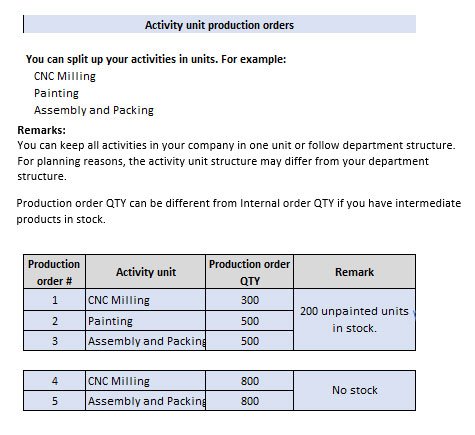
Work Order – An instruction for action (production or tasks) to a department (head) that will be broken down into production jobs (and project user tasks).
Product – the item that is the final output of your production and that will be shipped to the customer.
Part – any item that is worked on in your production. A part can be the final product or the product may consist of different parts.
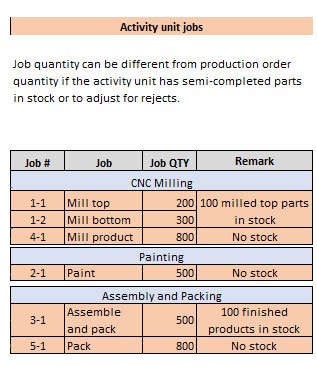
Job – are created for each time that a part is sent to a machine or workstation for a production step.

Customer Order – is a quantity of a product ordered by a customer.
A project can have several Customer Orders. For example, if the customer orders multiple products or when there are repeat orders.
Every customer order is connected to a project.
Internal Order – is a quantity of a product that has to be produced to complete Customer Order.
Internal Order quantity (QTY) can be different from Customer Order QTY if you have some finished products in stock (for ex., from previous orders). By default, the system sets the Customer Order QTY as Internal Order QTY, but it may be changed at any time.

Work Order – is an instruction to an Operational Department. The Work Order is handled by the department head and will lead to (production) Jobs and (User tasks).
The system automatically tracks all time spent on Production Jobs and User Tasks connected to a Work Order. This is convenient for billing and cost price analysis.
Operational Department– is a department to which Work Orders can be issued. Typically it is a production department, but other departments can be set to operational if you want to issue Work Orders.
Your company may start with a single Operational Department (for example: “Production”)
However, when you have different departments with their own managers and output responsibility, you follow your department structure.
In case you want to track (for example) efforts spent in Product Development work, you will issue Work Orders to an Operational Department “R&D”.

Job – is a piece of production activity (activity unit), needed for parts of a product to pass through certain manufacturing step/stage.
Simply said, every time a batch of (product) parts goes to a machine or workstation, a job is created. Jobs can be scheduled in the scheduling module. If connected to a smart card, the system will recognize the job as soon as the smart card is placed on the M-Box (even when the job was not pre-scheduled).

Orders >
[popup_anything id=”15367″]